0%

如何创建自己的form表单组件?

所需知识:

  1. 实现自己的v-model
  2. 利用slot插槽,写出el-form-item
  3. 使用prop传参定义校验字段,emit抛出数据

GitHub上一个比较有名的项目,里面有些功能实现值得学习。
整个实现(mock-js,dev-server,chokidar)还需要node\express相关知识,总体实现就是使用 dev-server,将mock出的数据返回。

  • 首先,从index看起
    1
    2
    3
    4
    module.exports = {
    mocks,
    mockXHR
    }
    导出了所有的mock路由,以及一个方法,该方法用来线上部署时改写xhr请求
  • 接着是比较重要的mock-server,照样看他导出了什么
    1
    2
    3
    4
    app.use(bodyParser.json())
    app.use(bodyParser.urlencoded({
    extended: true
    }))
    一开始看这部分还是挺懵逼的,结合vue.config.js之后才明白这点。参考官方文档可知道 devserver before接收一个函数function,携带参数app,实际上就和写express一样了。现在,需要的就是注册路由了,用到了另一个函数
    1
    2
    3
    4
    5
    6
    7
    8
    9
    10
    11
    12
    13
    14
    15
    16
      function registerRoutes(app) {
    let mockLastIndex
    const { mocks } = require('./index.js')
    const mocksForServer = mocks.map(route => {
    return responseFake(route.url, route.type, route.response)
    })
    for (const mock of mocksForServer) {
    app[mock.type](mock.url, mock.response) // 相当于app.get('url',{})
    mockLastIndex = app._router.stack.length
    }
    const mockRoutesLength = Object.keys(mocksForServer).length
    return {
    mockRoutesLength: mockRoutesLength,
    mockStartIndex: mockLastIndex - mockRoutesLength
    }
    }
    这里用到的长度,一开始想着难道mock路由数和_router下的不一样不成,后面看了这个
    链接StackOverflow
    确实不一样…
    结合上面这两点,基本就能理解代码逻辑

昨天打码的时候,发现使用

1
require('@/mock/index')

vscode没有对这个路径进行跳转,第一时间,我想的是,@别名导致的,但是其实我本人有写jsconfig.json,但是谷歌搜索都是这样.我便开始一段对该配置文件探索和迷惑的一段时间…

  1. 开始看到一个插件,叫’别名跳转’试了下,确实可以,但是有个问题就是在使用import..from…时,无法正确跳转,冲突了.于是抛弃.
  2. 又开始纠结jsconfig.json试了各种包括加上module:commonjs,target:es6,各种重启…结果自然,还是发现不如用插件呢.

原因:

其实,自带就有跳转,主要是因为,我在index.js里没有写

1
module.exports={}

好了,误会解除…

收获

这些路径啊智能跳转啥的,本质就是读取目录以及内容,用的node fs模块来完成..估计就是检测不到导出,就不会有跳转了..

webpackCli

1
2
3
4
5
6
7
8
9
10
11
12
13
14
15
16
17
18
19
20
21
22
23
24
25
26
27
28
29
30
31
32
33
34
35
36
37
38
39
40
41
42
43
44
45
46
47
48
49
50
51
52
53
54
55
56
57
58
59
60
61
62
63
64
65
66
67
68
69
70
71
72
73
74
75
76
77
78
79
80
81
Usage: webpack serve|server|s [entries...] [options]

Run the webpack dev server.

Options:
-c, --config <value...> Provide path to a webpack configuration file e.g.
./webpack.config.js.
--config-name <value...> Name of the configuration to use.
-m, --merge Merge two or more configurations using
'webpack-merge'.
--env <value...> Environment passed to the configuration when it
is a function.
--node-env <value> Sets process.env.NODE_ENV to the specified value.
--progress [value] Print compilation progress during build.
-j, --json [value] Prints result as JSON or store it in a file.
-d, --devtool <value> Determine source maps to use.
--no-devtool Do not generate source maps.
--entry <value...> The entry point(s) of your application e.g.
./src/main.js.
--mode <value> Defines the mode to pass to webpack.
--name <value> Name of the configuration. Used when loading
multiple configurations.
-o, --output-path <value> Output location of the file generated by webpack
e.g. ./dist/.
--stats [value] It instructs webpack on how to treat the stats
e.g. verbose.
--no-stats Disable stats output.
-t, --target <value...> Sets the build target e.g. node.
--no-target Negative 'target' option.
--watch-options-stdin Stop watching when stdin stream has ended.
--no-watch-options-stdin Do not stop watching when stdin stream has ended.
--bonjour Broadcasts the server via ZeroConf networking on
start
--lazy Lazy
--liveReload Enables/Disables live reloading on changing files
--serveIndex Enables/Disables serveIndex middleware
--inline Inline mode (set to false to disable including
client scripts like livereload)
--profile Print compilation profile data for progress steps
--progress Print compilation progress in percentage
--hot-only Do not refresh page if HMR fails
--stdin close when stdin ends
--open [value] Open the default browser, or optionally specify a
browser name
--useLocalIp Open default browser with local IP
--open-page <value> Open default browser with the specified page
--client-log-level <value> Log level in the browser (trace, debug, info,
warn, error or silent)
--https HTTPS
--http2 HTTP/2, must be used with HTTPS
--key <value> Path to a SSL key.
--cert <value> Path to a SSL certificate.
--cacert <value> Path to a SSL CA certificate.
--pfx <value> Path to a SSL pfx file.
--pfx-passphrase <value> Passphrase for pfx file.
--content-base <value> A directory or URL to serve HTML content from.
--watch-content-base Enable live-reloading of the content-base.
--history-api-fallback Fallback to /index.html for Single Page
Applications.
--compress Enable gzip compression
--port <value> The port
--disable-host-check Will not check the host
--socket <value> Socket to listen
--public <value> The public hostname/ip address of the server
--host <value> The hostname/ip address the server will bind to
--allowed-hosts <value...> A list of hosts that are allowed to access the
dev server, separated by spaces

Global options:
--color Enable colors on console.
--no-color Disable colors on console.
-v, --version Output the version number of 'webpack',
'webpack-cli' and 'webpack-dev-server' and
commands.
-h, --help [verbose] Display help for commands and options.

To see list of all supported commands and options run 'webpack --help=verbose'.

Webpack documentation: https://webpack.js.org/.
CLI documentation: https://webpack.js.org/api/cli/.
Made with ♥ by the webpack team.

webapck 开发环境代码:

1
2
3
4
5
6
7
8
9
10
11
12
13
14
15
16
17
18
19
20
21
22
23
24
25
26
27
28
29
30
31
32
33
34
35
36
37
38
39
40
41
42
43
44
45
46
47
48
49
50
51
52
53
54
55
56
57
58
59
60
61
62
63
64
65
66
67
68
69
70
71
72
73
74
75
76
77
78
79
80
81
82
83
84
85
86
87
88
89
90
91
92
93
94
95
96
97
98
// resolve用来拼接绝对路径的方法
const { resolve } = require('path')
const HtmlWebpackPlugin = require('html-webpack-plugin') // 引用plugin

module.exports = {
// webpack配置
entry: './src/js/index.js', // 入口起点
output: {
// 输出
// 输出文件名
filename: 'js/build.js',
// __dirname是nodejs的变量,代表当前文件的目录绝对路径
path: resolve(__dirname, 'build'), // 输出路径,所有资源打包都会输出到这个文件夹下
},
// loader配置
module: {
rules: [
// 详细的loader配置
// 不同文件必须配置不同loader处理
{
// 匹配哪些文件
test: /\.less$/,
// 使用哪些loader进行处理
use: [
// use数组中loader执行顺序:从右到左,从下到上,依次执行(先执行css-loader)
// style-loader:创建style标签,将js中的样式资源插入进去,添加到head中生效
'style-loader',
// css-loader:将css文件变成commonjs模块加载到js中,里面内容是样式字符串
'css-loader',
// less-loader:将less文件编译成css文件,需要下载less-loader和less
'less-loader'
],
},
{
test: /\.css$/,
use: ['style-loader', 'css-loader'],
},
{
// url-loader:处理图片资源,问题:默认处理不了html中的img图片
test: /\.(jpg|png|gif)$/,
// 需要下载 url-loader file-loader
loader: 'url-loader',
options: {
// 图片大小小于8kb,就会被base64处理,优点:减少请求数量(减轻服务器压力),缺点:图片体积会更大(文件请求速度更慢)
// base64在客户端本地解码所以会减少服务器压力,如果图片过大还采用base64编码会导致cpu调用率上升,网页加载时变卡
limit: 8 * 1024,
// 给图片重命名,[hash:10]:取图片的hash的前10位,[ext]:取文件原来扩展名
name: '[hash:10].[ext]',
// 问题:因为url-loader默认使用es6模块化解析,而html-loader引入图片是conmonjs,解析时会出问题:[object Module]
// 解决:关闭url-loader的es6模块化,使用commonjs解析
esModule: false,
outputPath: 'imgs',
},
},
{
test: /\.html$/,
// 处理html文件的img图片(负责引入img,从而能被url-loader进行处理)
loader: 'html-loader',
},
// 打包其他资源(除了html/js/css资源以外的资源)
{
// 排除html|js|css|less|jpg|png|gif文件
exclude: /\.(html|js|css|less|jpg|png|gif)/,
// file-loader:处理其他文件
loader: 'file-loader',
options: {
name: '[hash:10].[ext]',
outputPath: 'media',
},
},
],
},
// plugin的配置
plugins: [
// html-webpack-plugin:默认会创建一个空的html文件,自动引入打包输出的所有资源(JS/CSS)
// 需要有结构的HTML文件可以加一个template
new HtmlWebpackPlugin({
// 复制这个./src/index.html文件,并自动引入打包输出的所有资源(JS/CSS)
template: './src/index.html',
}),
],
// 模式
mode: 'development', // 开发模式
// 开发服务器 devServer:用来自动化,不用每次修改后都重新输入webpack打包一遍(自动编译,自动打开浏览器,自动刷新浏览器)
// 特点:只会在内存中编译打包,不会有任何输出(不会像之前那样在外面看到打包输出的build包,而是在内存中,关闭后会自动删除)
// 启动devServer指令为:npx webpack-dev-server
devServer: {
// 项目构建后路径
contentBase: resolve(__dirname, 'build'),
// 启动gzip压缩
compress: true,
// 端口号
port: 3000,
// 自动打开浏览器
open: true,
},
}

webapck生产环境代码:

1
2
3
4
5
6
7
8
9
10
11
12
13
14
15
16
17
18
19
20
21
22
23
24
25
26
27
28
29
30
31
32
33
34
35
36
37
38
39
40
41
42
43
44
45
46
47
48
49
50
51
52
53
54
55
56
57
58
59
60
61
62
63
64
65
66
67
68
69
70
71
72
73
74
75
76
77
78
79
80
81
82
83
84
85
86
87
88
89
90
91
92
93
94
95
96
97
98
99
100
101
102
103
104
105
106
107
108
109
110
111
112
113
114
115
116
117
118
119
120
121
122
123
124
125
126
127
128
129
130
131
132
133
134
135
136
137
138
139
140
141
142
143
144
145
146
147
148
149
150
151
152
153
154
155
156
157
158
159
160
161
162
163
164
165
166
167
168
169
170
171
172
const { resolve } = require('path')
const MiniCssExtractorPlugin = require('mini-css-extract-plugin')
const OptimiziCssAssetsWebpackPlugin = require('optimizi-css-assets-webpack-plugin')
const HtmlWebpackPlugin = require('html-webpack-plugin')

// 定义node.js的环境变量,决定使用browserslist的哪个环境
process.env.NODE_ENV = 'production'

// 复用loader的写法
const commonCssLoader = [
// 这个loader取代style-loader。作用:提取js中的css成单独文件然后通过link加载
MiniCssExtractPlugin.loader,
// css-loader:将css文件整合到js文件中
// 经过css-loader处理后,样式文件是在js文件中的
// 问题:1.js文件体积会很大2.需要先加载js再动态创建style标签,样式渲染速度就慢,会出现闪屏现象
// 解决:用MiniCssExtractPlugin.loader替代style-loader
'css-loader',
/*
postcss-loader:css兼容性处理:postcss --> 需要安装:postcss-loader postcss-preset-env
postcss需要通过package.json中browserslist里面的配置加载指定的css兼容性样式
在package.json中定义browserslist:
"browserslist": {
// 开发环境 --> 设置node环境变量:process.env.NODE_ENV = development
"development": [ // 只需要可以运行即可
"last 1 chrome version",
"last 1 firefox version",
"last 1 safari version"
],
// 生产环境。默认是生产环境
"production": [ // 需要满足绝大多数浏览器的兼容
">0.2%",
"not dead",
"not op_mini all"
]
},
*/
{
loader: 'postcss-loader',
options: {
ident: 'postcss', // 基本写法
plugins: () => [
// postcss的插件
require('postcss-preset-env')(),
],
},
},
]

module.exports = {
entry: './src/js/index.js',
output: {
filename: 'js/built.js',
path: resolve(__dirname, 'build'),
},
module: {
rules: [
{
test: /\.css$/,
use: [...commonCssLoader],
},
{
test: /\.less$/,
use: [...commonCssLoader, 'less-loader'],
},
/*
正常来讲,一个文件只能被一个loader处理
当一个文件要被多个loader处理,那么一定要指定loader执行的先后顺序
先执行eslint再执行babel(用enforce)
*/
{
/*
js的语法检查: 需要下载 eslint-loader eslint
注意:只检查自己写的源代码,第三方的库是不用检查的
airbnb(一个流行的js风格) --> 需要下载 eslint-config-airbnb-base eslint-plugin-import
设置检查规则:
package.json中eslintConfig中设置
"eslintConfig": {
"extends": "airbnb-base", // 继承airbnb的风格规范
"env": {
"browser": true // 可以使用浏览器中的全局变量(使用window不会报错)
}
}
*/
test: /\.js$/,
exclude: /node_modules/, // 忽略node_modules
enforce: 'pre', // 优先执行
loader: 'eslint-loader',
options: {
// 自动修复
fix: true,
},
},
/*
js兼容性处理:需要下载 babel-loader @babel/core
1. 基本js兼容性处理 --> @babel/preset-env
问题:只能转换基本语法,如promise高级语法不能转换
2. 全部js兼容性处理 --> @babel/polyfill
问题:只要解决部分兼容性问题,但是将所有兼容性代码全部引入,体积太大了
3. 需要做兼容性处理的就做:按需加载 --> core-js
*/
{
// 第三种方式:按需加载
test: /\.js$/,
exclude: /node_modules/,
loader: 'babel-loader',
options: {
// 预设:指示babel做怎样的兼容性处理
presets: [
'@babel/preset-env', // 基本预设
{
useBuiltIns: 'usage', //按需加载
corejs: { version: 3 }, // 指定core-js版本
targets: { // 指定兼容到什么版本的浏览器
chrome: '60',
firefox: '50',
ie: '9',
safari: '10',
edge: '17'
},
},
],
},
},
{
// 图片处理
test: /\.(jpg|png|gif)/,
loader: 'url-loader',
options: {
limit: 8 * 1024,
name: '[hash:10].[ext]',
outputPath: 'imgs',
esModule: false, // 关闭url-loader默认使用的es6模块化解析
},
},
// html中的图片处理
{
test: /\.html$/,
loader: 'html-loader',
},
// 处理其他文件
{
exclude: /\.(js|css|less|html|jpg|png|gif)/,
loader: 'file-loader',
options: {
outputPath: 'media',
},
},
],
},
plugins: [
new MiniCssExtractPlugin({
// 对输出的css文件进行重命名
filename: 'css/built.css',
}),
// 压缩css
new OptimiziCssAssetsWebpackPlugin(),
// HtmlWebpackPlugin:html文件的打包和压缩处理
// 通过这个插件会自动将单独打包的样式文件通过link标签引入
new HtmlWebpackPlugin({
template: './src/index.html',
// 压缩html代码
minify: {
// 移除空格
collapseWhitespace: true,
// 移除注释
removeComments: true,
},
}),
],
// 生产环境下会自动压缩js代码
mode: 'production',
}

来源博客

今天面试被问到一个问题,之前都没遇见过,问父子组件生命周期加载顺序,把我整懵了.

答案

1.加载渲染过程
父beforeCreate->父created->父beforeMount->子beforeCreate->子created->子beforeMount- >子mounted->父mounted

2.子组件更新过程
父beforeUpdate->子beforeUpdate->子updated->父updated

3.父组件更新过程
父beforeUpdate->父updated

4.销毁过程
父beforeDestroy->子beforeDestroy->子destroyed->父destroyed

理解

组件的调用顺序都是先父后子,渲染完成的顺序肯定是先子后父

组件的销毁操作是先父后子,销毁完成的顺序是先子后父

原理

  • 当dom渲染时,会createElm创建元素,创建元素后会进行初始化,初始化组件的时候内部还有组件,会不停的去渲染,所以它的渲染顺序是先父后子,完成的顺序是先子后父。

  • dom渲染描述:先父组件要创建beforeCreate、created,父组件实例化完成后要挂载这个父组件beforeMount,挂载父组件的时候会调用父的render方法,渲染的时候发现里面有子组件,这时就会调用子组件的beforeCreate、created、beforeMount,当子组件都完成之后,会把子组件先存起来,这儿有队列,不是子完成就会调用子的mounted,因为子组件中可能还有子组件,这时会暂存一下,到最后子全完成了会按照子调父的调,mounted是先子后父。

  • 源码:在dom渲染和更新时就会调用patch方法,在patch方法中有一个insertedVnodeQueue数组,会将所有的vnode存放在insertedVnodeQueue中,最后会在整个创建完之后会调用invokeInsertHook方法,依次调用收集的insert hook。在patch中会调用createElm方法来创建元素,createElm方法中会对元素进行判断:如果元素是组件,会调用createComponent方法创建组件,调用组件的init方法渲染当前组件的内容,通过initComponent方法将pendingInsert插入到自己的insertedVnodeQueue中,然后将它置为null,最后会调用invokeCreateHooks方法将vnode存放在insertedVnodeQueue中;如果元素不是组件,会调用createChildren方法递归遍历子节点(子组件),createChildren方法中会再次调用createElm方法,直到元素不是一个组件时。

  • 当所有组件都完成后,会调用invokeInsertHook方法,里面会循环通过insert方法依次调用收集的hook,在insert方法中就会触发mounted。
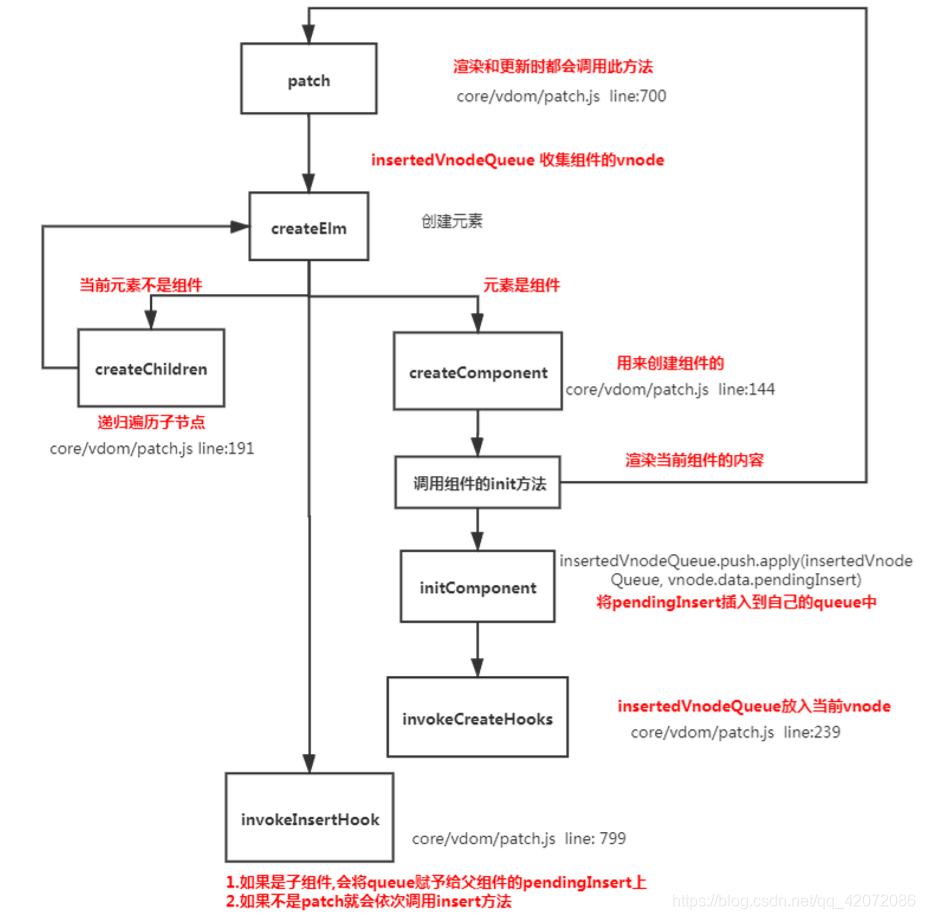
    流程

原文链接

为什么有mutation还要有action

  • Mutation 必须是同步函数一条重要的原则就是要记住

现在想象,我们正在 debug 一个 app 并且观察 devtool 中的 mutation 日志。每一条 mutation 被记录,devtools 都需要捕捉到前一状态和后一状态的快照。然而,在上面的例子中 mutation 中的异步函数中的回调让这不可能完成:因为当 mutation 触发的时候,回调函数还没有被调用,devtools 不知道什么时候回调函数实际上被调用——实质上任何在回调函数中进行的状态的改变都是不可追踪的。
今天被问得有点奇怪,说为什么有了action还要mutation…事实上action只是当一个延后提交mutation的方法,真正改数据的还是mutation.也就不存在,两者重复一说.

许多开发人员经常混淆作用域和执行上下文的概念,误认为它们是相同的概念,但事实并非如此。

我们知道 JavaScript 属于解释型语言,JavaScript 的执行分为:解释和执行两个阶段,这两个阶段所做的事并不一样:

  • 解释阶段:

1.词法分析
2.语法分析
3.作用域规则确定

  • 执行阶段:

1.创建执行上下文
2.执行函数代码
3.垃圾回收

1.JavaScript 解释阶段便会确定作用域规则,因此作用域在函数定义时就已经确定了,而不是在函数调用时确定,但是执行上下文是函数执行之前创建的。执行上下文最明显的就是 this 的指向是执行时确定的。而作用域访问的变量是编写代码的结构确定的。

2.作用域和执行上下文之间最大的区别是:
执行上下文在运行时确定,随时可能改变;作用域在定义时就确定,并且不会改变。

3.一个作用域下可能包含若干个上下文环境。有可能从来没有过上下文环境(函数从来就没有被调用过);有可能有过,现在函数被调用完毕后,上下文环境被销毁了;有可能同时存在一个或多个(闭包)。同一个作用域下,不同的调用会产生不同的执行上下文环境,继而产生不同的变量的值。

Vite到手,先新建了个Vue3项目,之前基本看了文档以及一些新语法,第一次用起来有几个看法:
1.新建的Vue模板文件中,有实验性因素,Vetur甚至没法识别script setup语法糖。
2.defineProps方法甚至在官网没出现相关介绍,虽然就是一个为props添加属性限定,同时return出去。
3.代码上,更方便也更加清晰一点,聚合API也不会像之前那样十几个方法写一页,在接触Vue2项目的时候这个确实是最烦的。
感觉还是得等有些语法成为正式版先.. 不然这语法提醒顶不住。

1
2
3
4
5
6
7
8
9
10
11
12
13
14
15
16
17
18
19
20
21
22
23
24
25
26
27
28
29
30
31
32
33
34
35
36
37
38
39
Markdown 目录:
[TOC]

Markdown 标题:
# 这是 H1
## 这是 H2
### 这是 H3

Markdown 列表:
- 列表项目
1. 列表项目

*斜体*或_斜体_
**粗体**
***加粗斜体***
~~删除线~~

Markdown 插入链接:
[链接文字](链接网址 "标题")

Markdown 插入图片:
![alt text](/path/to/img.jpg "Title")


Markdown 引用:
> 引用内容

Markdown 分割线:
---

Markdown 换行:
<br>

Markdown 段首缩进:
&ensp; or &#8194; 表示一个半角的空格
&emsp; or &#8195; 表示一个全角的空格
&emsp;&emsp; 两个全角的空格(用的比较多)
&nbsp; or &#160; 不断行的空白格

Vite为什么那么快?

学习Vue3时期,顺带被尤小右安利一波Vite。看过文档,大概理解是一个打包构建工具,但不同于webpack,他采用ESbuild,也即是使用浏览器支持的&lt;script type="module" /&gt; 来引入依赖的文件。Vite担当服务器的作用,利用缓存,以及其他机制来达到甩开webpack的速度。

留个官网中文文档地址:为什么选Vite | Vite 官方中文文档 (vitejs.dev)
模块示意

React学习项目地址

最近学React,仓库放点小demo。

1.gameDemo : 井字游戏